Docs
One command:
autooptm
Optimise on your own machine or hand the project to our GPUs: the same autooptm does both. Every step — each command run, what gets uploaded, when credits are spent — is shown to you and confirmed before it happens.
curl -fsSL https://autooptm.com/install.sh | shone file, into ~/.local/binautooptmthe terminal UI: signs you in, then optimises hereautooptm run --cloud .or our GPUs: a free estimate firstInstall
One command. It fetches the autooptm built for your system (Linux or macOS, x86_64 or arm64), checks it against the published SHA256, and puts it in ~/.local/bin: no root, and nothing else on the machine is changed.
$ curl -fsSL https://autooptm.com/install.sh | sh
autooptm v0.1.0-beta… for linux/amd64
  checksum ok
  installed ~/.local/bin/autooptm (ao-cli is another name for it)
To install elsewhere (for every user, say), put AUTOOPTM_INSTALL_DIR=/usr/local/bin before sh; you need write access there. Without curl: wget -qO- https://autooptm.com/install.sh | sh. Afterwards autooptm version shows the version and the backend it talks to.
To read the script before running it: install.sh. Or download by hand: SHA256SUMS lists each platform's archive under dl/autooptm/; unpack autooptm onto your PATH. To update, run the install command again; to uninstall, delete ~/.local/bin/autooptm (and ao-cli, its other name); its own environments and cache live in ~/.cache/autooptm-cli. Windows is not supported yet: use the Linux build inside WSL.
autooptm with pip before? That Python package is no longer updated, and its command is also called autooptm: earlier on your PATH, it hides this one. Remove it first with pipx uninstall autooptm (or pip uninstall autooptm). The login is the same one; there is no need to sign in again.Sign in
Sign in first, once: the same login serves your machine and our GPUs. Open autooptm and, with no login yet, the whole screen is the sign-in page; or run autooptm login. It opens your browser so you can approve this machine. The terminal then receives a 30-day token, renewed on every use and stored at ~/.config/autooptm/token.
$ autooptm login
signed in as you@example.com; token saved to ~/.config/autooptm/token (valid 30 days, and it slides on use)

# a server with no browser: print the approval URL, open it anywhere
$ autooptm login --no-browser

# or the email code (QQ / 163 mail work): one command sends it, the next verifies
$ autooptm login --email you@example.com
$ autooptm login --email you@example.com --code 482913

$ autooptm balance
12.4 credits (≈ $12.4)
$ autooptm logout
CI and scripts: API keys
Where a browser is not available, use an API key. The key is shown only once. Default scopes are read,submit; unlock spends credits and must be granted explicitly. Set it as AUTOOPTM_TOKEN and the CLI picks it up automatically.
$ autooptm keys create "CI pipeline" --scopes read,submit --expires-in-days 90
$ autooptm keys list
$ autooptm keys revoke <keyId>
$ export AUTOOPTM_TOKEN=ao_…
On your own machine: autooptm beta
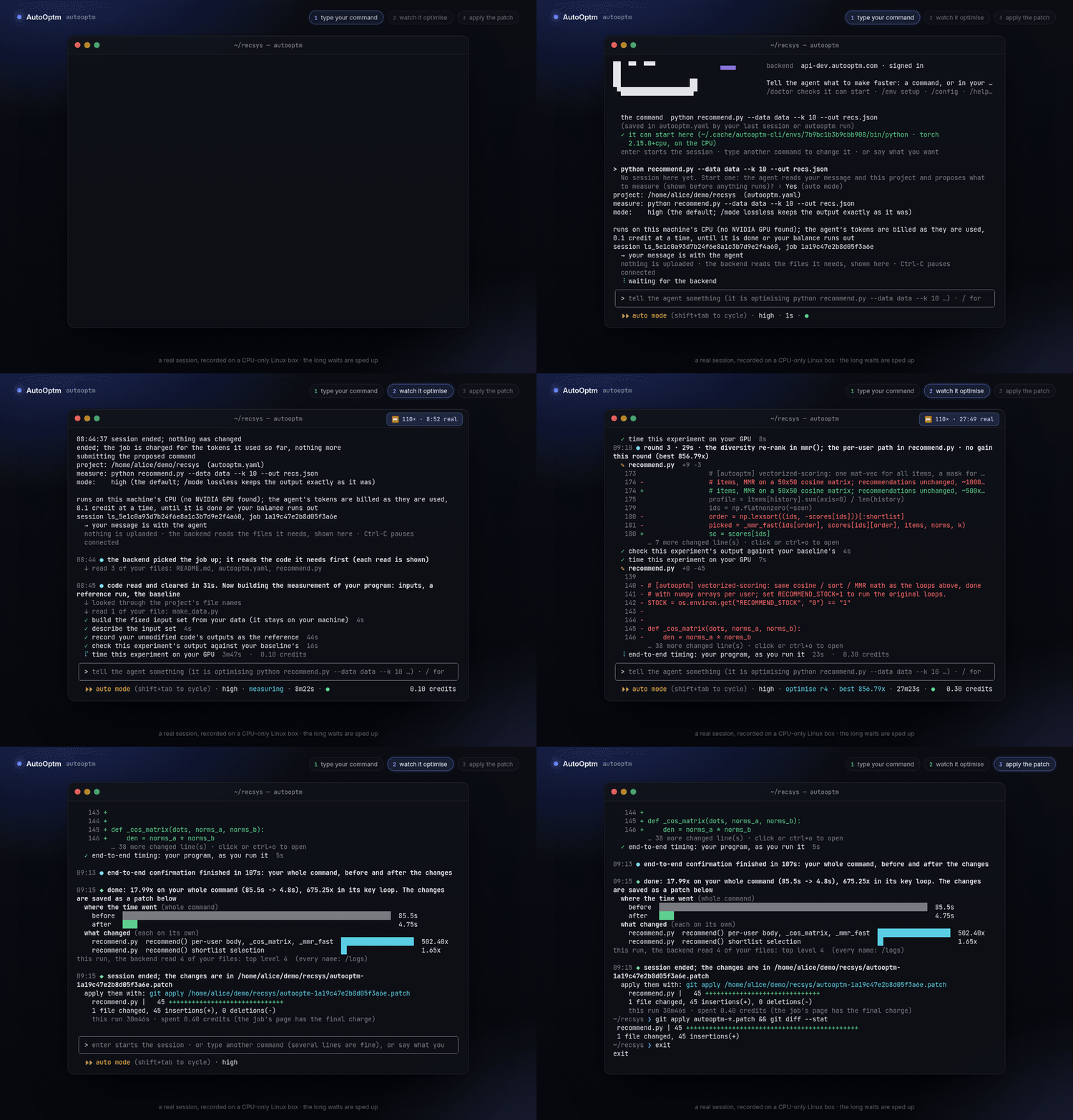
Optimise on your own machine: the code, the data and the GPU stay where they are, and nothing is uploaded. The agent thinks on our side; every file it reads and every command it runs is asked for over a connection your machine opens, and shown in your terminal. You end with a patch, yours to apply or not. A machine without a GPU works too: it is then a CPU job.
Getting started
$ curl -fsSL https://autooptm.com/install.sh | sh
$ cd ~/my-project                  # with the env your program runs in active (conda / venv)
$ autooptm                         # the first time: approve this machine in the browser

> python train.py --epochs 1      # how you run it, or what you want, in your words
autooptm with nothing after it is the terminal UI; not signed in yet, it signs you in first. Type how you run your program (several lines are fine), or say in your own words what should get faster: either goes to the agent, which reads the project, settles the command to measure and starts; it is billed as used, and pauses if the balance runs out. The command is kept in autooptm.yaml: next time, it first checks here that the command can start (a missing package or torch goes into its own isolated environment, leaving yours alone), and enter alone starts another session on it.
What you will use
| Type | What it does |
|---|---|
| python train.py … | A line without a slash goes to the agent: the command you run, or your own words; during a session it is a message to the agent. Once the command to measure is settled it is saved to autooptm.yaml, and enter on an empty line (or /submit) reuses it. |
| /submit · /resume · /end | Start the session autooptm.yaml describes; carry on a paused one; end it, with the changes saved as a .patch (asks first). |
| /status · /diff · /logs | Where the session is and what it has spent; what it has changed in your files so far; the full record. All work while a session runs. |
| /env setup | Install what is missing, and the right torch, into autooptm's own environment (the CUDA build for your driver, or the ~200 MB CPU build without a card). |
| ! nvidia-smi | Run a line in your own shell without leaving. |
| shift+tab | Switch between auto mode (the default: commands run as asked, still shown and recorded) and manual mode (each one asks first); autooptm tui --manual starts asking. |
| ctrl+c ×2 · ctrl+d | Pause the session (nothing is charged while paused); leave (a running session is paused first). |
Examples
# a fresh machine: no torch yet, and the program needs it
> python infer.py --images ./samples
  ✗ CANNOT START: torch is not installed …  set it up now? › Yes   # → /env setup, in autooptm's own env

# the balance ran out and the session paused: top up, then carry on
> /resume

# step away: pause now, pick it up later (or on another day)
ctrl+c ctrl+c
$ autooptm
> /resume

# done: the patch is in the project
$ git apply autooptm-*.patch
Beta: Linux (tested on x86_64; arm64 builds are published). macOS connects but is not optimised on; Windows is not supported yet (WSL works). Billed by the tokens the agent uses, 0.1 credit at a time, with no machine charge (the GPU is yours).
On our GPUs: run --cloud
run --cloud takes a public Git URL or a local directory (the current one when none is named) and handles the entire flow: packaging, the free estimate, confirming whether to continue, waiting for results, and quoting the patch price. If your connection drops, the job keeps running on our side; wait reattaches to it.
Mirror the command you normally run: the entry script goes in --entrypoint, the remaining arguments in --args. Leave the GPU on auto to run on an RTX 4090; choose RTX5090 if your model does not fit; choose CPU if the program uses no GPU, in which case there is no machine charge at all.
A local directory is inventoried on your machine first. You are asked about weights, data, large files and very large directories one by one, and nothing is uploaded until you confirm. See what gets uploaded.
A static scan that finishes in seconds; none of your code runs and nothing is charged. It reports the expected speedup and its range, then asks whether to continue.
Answer y and the 2-credit analysis deposit is taken, credited in full against the patch and returned when no speedup is found or the failure is ours. Answer n, or don't answer, and the job stays at the estimate, free of charge.
When the run finishes, it reports the measured end-to-end speedup and the patch price. unlock confirms once more before charging and writes autooptm.patch; git apply does the rest. Under 1.10× no patch is sold and the deposit comes back.
$ autooptm run --cloud . --entrypoint train.py --workload training --gpu auto
skipped: .git (1), __pycache__ (14)
y = into the code archive · n = leave out · d = upload as the private dataset instead (sandbox only, 7 days, up to 1 GB, one per run)
  checkpoints/                 weight files: 2, 1.9 GB (.pt×2)  include? [y/N/d] n
  data/                        crowded directory: 1204 files, 310 MB (0 of 1204 files are code)  include? [y/N/d] d
  data/ goes up as the dataset, unpacked at ./data

packing 87 files, 1.4 MB before compression:
  src/                                         62 files     1.1 MB
  configs/                                     14 files      38 KB
  train.py                                      1 files      12 KB
dataset: /home/you/repo/data -> ./data in the sandbox
upload? [Y/n] y
uploading the code: 87 files, 412 KB compressed
uploading dataset [############################] 100.0%    310.0/310.0 MB
job 7f3c2a1b queued
  [00:00] queued (estimate)
estimate: expected 1.6x · range 1.2x - 2.3x · lossless 1.4x
next: autooptm decide 7f3c2a1b continue   (takes the deposit, credited against the unlock)
      autooptm decide 7f3c2a1b stop       (free)
continue? takes the analysis deposit (2 credits) [y/N] y
continuing: the deposit is taken and the job is queued for a GPU
  [00:52] running (run) · preparing measurements
  …
1.61x  (937.8s -> 582.5s)
patch: locked. unlock for 4.6 credits (autooptm unlock 7f3c2a1b)
report: https://api.autooptm.com/api/my/reports/…

$ autooptm unlock 7f3c2a1b
Unlock spends 4.6 credits. Continue? [y/N] y
charged 4.6 credits; patch -> autooptm.patch
apply with: git apply autooptm.patch
$ git apply autooptm.patch
autooptm wait <jobId> resumes waiting, autooptm status <jobId> checks its status, autooptm estimate <jobId> shows the estimate again.What gets uploaded
A local directory is scanned and packaged on your machine. You decide what goes into the code archive:
| Category | Handling |
|---|---|
| .git, caches, virtualenvs, editor state | Skipped, noted once on a skipped: line: __pycache__, .venv, node_modules, wandb, .idea, .DS_Store and the like. |
| Weight filesasked | .pt .pth .ckpt .safetensors .onnx .npz .bin .gguf and similar, listed per directory, excluded by default. |
| Data filesasked | Images, audio, video, tables, .npy / .h5 / .pkl, archives and similar, listed per directory, excluded by default. |
| Any file over 8 MBasked | Listed individually, excluded by default. |
| A directory with over 200 filesasked | Listed with its file count, size and share of code. Included by default when at least half is code (e.g. src/), excluded otherwise (e.g. outputs/). |
Each group takes one of three answers: y to include it in the code archive, n to leave it out, or d to upload it as the private dataset. The dataset travels through a separate channel: sandbox only, deleted after seven days, up to 1 GB, and extracted at the same relative path so your command does not change. One dataset per run. Once you have answered, the packing list is printed, and nothing is uploaded until you confirm. The code archive is capped at 64 MB compressed.
# only show the list; nothing leaves the machine
$ autooptm run --cloud . --entrypoint train.py --dry-run

# answer from the command line instead of the prompts
$ autooptm run --cloud . --entrypoint train.py --include checkpoints --exclude outputs --yes

# send a directory as the dataset, unpacked at ./data in the sandbox
$ autooptm run --cloud . --entrypoint train.py --dataset ./data --dataset-path data --yes
--yes, run --cloud prints the list and stops (exit 1). Preview with --dry-run first, then submit with --include / --exclude and --yes.Command reference
| Command | What it does | Flags |
|---|---|---|
| autooptm | The terminal UI: optimise the project in this directory on this machine (signing you in first if needed). /help lists its commands. | tui --manual |
| run COMMAND | Optimise this command on this machine, without the UI (line view). autooptm help lists every local-session command: doctor, env, resume, say, end, logs, diff and more. | --mode high|lossless--allow-all-commands--detach |
| run --cloud SOURCE | Submit a public Git URL or a local directory and wait for completion. The free estimate runs first and asks before continuing; --no-wait returns immediately after submission. | --entrypoint main.py--workload training|inference--gpu auto|RTX4090|RTX5090|CPU--args "…"--setup FILE--git-ref REF--model opus|glm--lang zh|en--dataset DIR_OR_ARCHIVE--dataset-path ./data--include PATH--exclude PATH--dry-run--no-estimate--no-wait--yes |
| wait JOB | Resume waiting on a job after a dropped connection or --no-wait. If the job is parked at the estimate, you are asked again whether to continue. | --yes--timeout SECONDS |
| estimate JOB | Show the free estimate again: expected value, range, the lossless tier and the review notes. | |
| decide JOB continue|stop | Answer the estimate. continue takes the 2-credit deposit, stop is free; no answer within seven days counts as stop. | --yes |
| status [JOB] | With a job id: a cloud job's current state, speedup and price; without one: this directory's local project and session. | |
| unlock JOB | Pay the quoted credits and download the patch. Confirms before charging; you never pay more than the quote. | --yes--out autooptm.patch |
| cancel JOB | Stop a queued or running job. A cancelled run is not charged. | |
| balance | Show available credits. | |
| datasets | List datasets this account has uploaded that have not yet expired; each can be reused directly by its key. | |
| login | Sign in by approving this machine in the browser, or use --email to sign in with an emailed code. | --no-browser--email ADDR--code NNNNNN--role … |
| logout | Remove the locally saved token. | |
| keys create|list|revoke | Manage API keys for CI and scripts. | create NAME --scopes read,submit,unlock --expires-in-days N |
| install-skill | Install the Claude Code skill into this machine's skills directory (see below). | --dest DIR |
Claude Code skill
The skill ships inside autooptm, so there is nothing else to download. Once the CLI is installed and signed in, a single command installs it into Claude Code's skills directory:
$ curl -fsSL https://autooptm.com/install.sh | sh
$ autooptm login
$ autooptm install-skill
installed autooptm-optimize -> ~/.claude/skills/autooptm-optimize/SKILL.md

# somewhere else, e.g. a project-level skills directory
$ autooptm install-skill --dest ./.claude/skills
Then open your repository in Claude Code and say "speed this repo up with AutoOptm", or invoke /autooptm-optimize. The skill guides Claude Code through the entire flow:
Find the command that runs training or inference end to end, asking you when unsure.
--dry-runAn agent has no interactive terminal, so it first lists what would be uploaded and what stays out, and submits with --include and --yes only after you agree.
It runs decide continue only with your explicit approval; otherwise the job stays at the free estimate.
It reports the speedup and the price, waits for your approval before running unlock, then runs git apply.
autooptm login and autooptm install-skill; the token does not travel with the skill.Environment and scripts
| AUTOOPTM_TOKEN | An API key or login token; when set, the locally saved token file is ignored. |
| AUTOOPTM_API | The API base URL; defaults to https://api.autooptm.com. |
| AUTOOPTM_INSTALL_DIR | Where the install script puts autooptm; defaults to ~/.local/bin. |
| XDG_CONFIG_HOME | Parent of the token file's directory; defaults to ~/.config. |
Non-interactive behavior
Every step that spends credits or uploads files requires explicit consent, which a script gives with --yes. Without it: run --cloud on a local directory prints the list and exits 1 without uploading; once the estimate is in, run --cloud prints parked at the estimate and exits 0, and the job waits free of charge until you answer with decide; unlock refuses. Transient errors (rate limits, network hiccups) are retried automatically; a submit, which must never be duplicated, is resent only when the server explicitly asks to retry later.